> ## Documentation Index
> Fetch the complete documentation index at: https://docs.myspellchecker.com/llms.txt
> Use this file to discover all available pages before exploring further.
# Overview
> Build optimized spell checking dictionaries from text corpora using the data pipeline CLI or Python API.
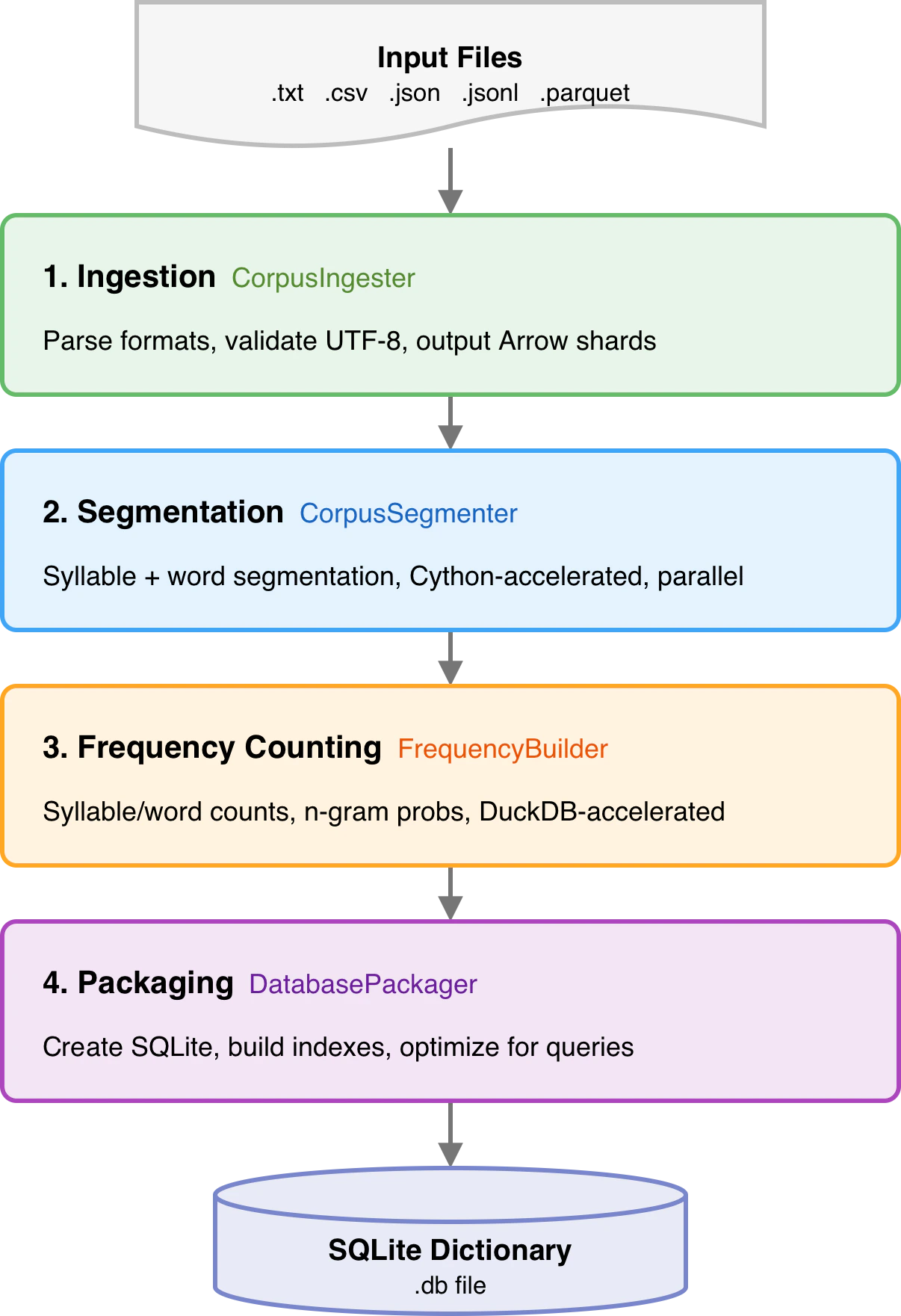
mySpellChecker does not include a bundled dictionary. You build your own from a text corpus. The data pipeline reads raw text, segments it into syllables and words, calculates N-gram probabilities, and packages everything into an optimized SQLite database.
## Quick Start
Build a dictionary from the command line:
```bash theme={null}
# Build from a text corpus
myspellchecker build --input corpus.txt --output dict.db
# Build a sample database for testing
myspellchecker build --sample
```
Or use the Python API for programmatic control:
```python theme={null}
from myspellchecker.data_pipeline import Pipeline
pipeline = Pipeline()
pipeline.build_database(
input_files=["corpus.txt"],
database_path="dict.db",
)
```
## Pipeline Architecture
 ## What the Database Contains
| Table | Content | Purpose |
| ------------------------------- | -------------------------------------- | ---------------------------- |
| `syllables` | Valid syllables + frequencies | Syllable validation |
| `words` | Words + frequencies + POS tags | Word validation, suggestions |
| `bigrams` | Word pair probabilities | Context checking (2-gram) |
| `trigrams` | Word triple probabilities | Context checking (3-gram) |
| `fourgrams` | 4-word sequence probabilities | Context checking (4-gram) |
| `fivegrams` | 5-word sequence probabilities | Context checking (5-gram) |
| `pos_unigrams/bigrams/trigrams` | POS tag probabilities | Grammar checking |
| `metadata` | Key-value build metadata | Build info, versioning |
| `processed_files` | Ingested file paths + timestamps | Incremental updates |
| `confusable_pairs` | Confusable word pairs + type + overlap | Confusable error detection |
| `compound_confusions` | Compound vs split-word pairs + PMI | Compound error detection |
| `collocations` | Word pair co-occurrence + PMI/NPMI | Collocation error detection |
| `register_tags` | Word register labels (formal/informal) | Register mixing detection |
## Next Steps
Supported input formats and requirements
CLI reference, Python API, config options
DuckDB acceleration, Cython, parallel workers
Curated lexicons, domain-specific builds
## What the Database Contains
| Table | Content | Purpose |
| ------------------------------- | -------------------------------------- | ---------------------------- |
| `syllables` | Valid syllables + frequencies | Syllable validation |
| `words` | Words + frequencies + POS tags | Word validation, suggestions |
| `bigrams` | Word pair probabilities | Context checking (2-gram) |
| `trigrams` | Word triple probabilities | Context checking (3-gram) |
| `fourgrams` | 4-word sequence probabilities | Context checking (4-gram) |
| `fivegrams` | 5-word sequence probabilities | Context checking (5-gram) |
| `pos_unigrams/bigrams/trigrams` | POS tag probabilities | Grammar checking |
| `metadata` | Key-value build metadata | Build info, versioning |
| `processed_files` | Ingested file paths + timestamps | Incremental updates |
| `confusable_pairs` | Confusable word pairs + type + overlap | Confusable error detection |
| `compound_confusions` | Compound vs split-word pairs + PMI | Compound error detection |
| `collocations` | Word pair co-occurrence + PMI/NPMI | Collocation error detection |
| `register_tags` | Word register labels (formal/informal) | Register mixing detection |
## Next Steps
Supported input formats and requirements
CLI reference, Python API, config options
DuckDB acceleration, Cython, parallel workers
Curated lexicons, domain-specific builds